Weather Widget

UPDATE: Corrected output to meet WC3 XHTML 1.0 Transitional Standards

I thought I would take a shot at creating a Widget to display the standard wunderground.com weather sticker. I could have used the built in Text Widget to add the needed code to display their weather sticker, but whats the fun in that. After checking out the provided samples and a few minutes of cursing, I managed to get my widget to work. Unfortunately for my foreign friends, the weather widget only allows you to enter US locations.

To install the weather widget:
Just upload wunder.php into the wp-content/plugins/widgets directory, activate the module from the Plugin Management page, and then go to the Sidebar Widgets page to configure your Title, City and State.

Configuration Example
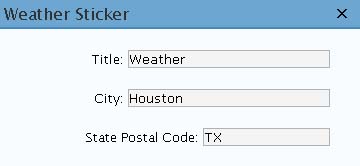
weather widget

28 Responses to “Weather Widget”

  1. WordPress Widgets » Blog Archive » Weather Says:

    [...] This Weather Widget displays your local weather from wunderground.com. [...]

  2. jivyb Says:

    Hi. I entered my info and it says “city not found”. Any ideas–I live in a state capitol, so hopefully wunderground has heard of it…

  3. dropdeaddick Says:

    Hi jivyb,

    It should work fine for your location. Are you entering the entire state name or the abbreviation? It will only work if you use the abbreviation, for example use TX not Texas.

  4. bruce Says:

    Cool widget!

  5. jivyb Says:

    I had the zip code instead of the state abbreviation. So I changed it but now it just displays the title and nothing else. I know this can’t be that complicated!

  6. Parm Says:

    Hiya,

    I’ve installed his Widget on my Blog, and although the Widget works, it doesn’t seem to find my town.
    If I visit the Wunderground.com website and search for Wolverhampton (my town), it finds it.
    But unfortunately, on the Widget it doesn’t.

    Do I have to be a US resident and therefore have to enter a US zipcode? I live in the UK.

    Kind Regards,
    Parm

  7. Eric Says:

    I’m just repeating what people are saying. The widget is installed fine but it says “Error. City Not Found.’

  8. dropdeaddick Says:

    Hi Parm,

    Sorry but this does not work for locations outside of the US. wunderground.com uses the city/state format for US locations only and all other locatiuons are based on station numbers. I created this for a friend that uses the wunderground.com sticker on his blog and wanted to switch to widgets. This widget was just so I could check out how widgets worked and make a friend happy. I realize it may not work for everyone but I thought I would share it anyway. To be honest there are several excellent weather plugins available that will be widgets soon. You may want to take a look at WeatherIcon as the creator says there is a widget in the works.

  9. dropdeaddick Says:

    Hi Eric,

    If you post your city and state I can try to assist you as I can’t see what the issue is without that information.

  10. A Blue Eyed Buddhist - Living life in the big city… » Updates… Says:

    [...] Weather Sticker. From DropDeadDick. (I’m not sure if that means the guy is a jerk, or if it’s just a nickname.) I might be switching to a different weather widget, because this one doesn’t work perfectly and is causing some validation problems for me, but it does work as far as the web page is concerned, so I might just leave it be. Just gives you the temperature and conditions for Seattle. [...]

  11. firedancer Says:

    Hello!

    I too am having problems getting this to work. I’m getting the “Error: city not found” as well. I live in Sacramento, CA and have tried about 10 different zip codes and get the same thing. The kicker is that if you click on the error, it takes directly to the weather for my city on wunderground. To make matters worse, my husband has this same widget on his blog page and it works perfectly.

    The guy that does the WeatherIcon has yet to release a widget version either…

  12. dropdeaddick Says:

    Hi FireDancer,

    It seems your error is related to my wording and I will change that.
    Please enter the following and this should work for you.

    City: Sacramento
    State Postal Code: CA

  13. firedancer Says:

    Hooray! It works! Now, how it’s working on my husband’s site with the zip code in the ’state postal code’ field is another story. :P

    Sorry for being such a noob. :)

  14. Itep Edor Says:

    I have changed it a little, so this one you can use for european cities. All you have to do is get the station number of the city on the wonderground.com side first. You can see the station number in der navigation bar when you are on the city side. Enter this number in the widget, that’s it.

    You can get this widget here: http://www.rodehacke.ch/Blog/wp-includes/images/images/wunder.zip

  15. Itep Edor Says:

    The Link above will not work any longer. I have a small update. I have an english and a german version now. It’s your choice.

    http://www.rodehacke.ch/Blog/wp-includes/images/images/wunder_en.zip

    http://www.rodehacke.ch/Blog/wp-includes/images/images/wunder_de.zip

  16. bymyreckoning.com » links for 2006-08-28 Says:

    [...] dropdeaddick.com » Blog Archive » Weather Widget (tags: wordpress) [...]

  17. Tony Rocksas Says:

    Thank “Itep Edor”, you change so is perfec for cities of Mexico.

    Saludos Calurosos desde la ciudad de Mexicali, Baja California.

    Gracias de Nuevo eres muy amable.

  18. timmers Says:

    I installed this and set it up properly with the town:

    Hilton Head Island
    State: SC

    I get error city not found even though I can click on the image and get the correct weather for my area, what’s going on?

  19. dropdeaddick Says:

    Hi timmers,

    This has been corrected, just grab the latest version and install.

  20. millionthmonkey.org » Manipulating Wordpress Widgets Says:

    [...] On the particular Page titled “About”, the “Links”, “Meta” and a custom Weather widget will appear in the About sidebar. [...]

  21. bemerkt.com - good to know Says:

    [...] December 5, 2006Weather-Widgets for Wordpress Nach intensiver Suche habe ich endlich ein passendes Wetter-Plugin für mein Blog entdeckt. Die Installation erfolgte mit der Widgets-Funktion einfach und problemlos. [...]

  22. Johan Says:

    I’m also having some problems with “Error. City Not Found”, but I’ll give it an other shot tomorrow and we’ll see if I can get it to work. Anyhow, great idea for a widget! Thanks

  23. AJRitz Says:

    Thanks for an elegant implementation of a weather widget.

    I’m not having any problem getting the sticker to display. But I do have one odd issue - the time display for the sticker is off by an hour. I’ve checked, and my time zone is set correctly in the WordPress General Options. Is there a way to fix that localization issue?

  24. Steve Young Says:

    Thank you it works great! Any thoughts of intelecast widget? I use a desktop feature from them that displays a small realtime map.

  25. Preston Says:

    Hi, I’m a bit of a n00b to wordpress and I uploaded php file, activated it, but it does not show up anywhere on my site.

  26. David Says:

    I don’t find my city…Dijon, in france :s
    Sbdy can help me ?

  27. My Adventures » New New New Says:

    [...] After many hours of going through themes I finally found one I like. This theme is called Dreamy 1.1. If you haven’t noticed I also started playing with some Widgets like the Weather one I got going on down toward the bottom along with Last.fm. [...]

  28. Jeremy Says:

    I’m using your weather widget in my left sidebar with a black background. Can you advise on what code to add/change to make the font color of the widget text white? I had no installation troubles but the black text on black background defeats the purpose. Appreciate any help!

Leave a Reply